

You do not need a large marketing team to use AI well.
You do not need to understand every new tool. You do not need fifty automated agents. And you do not need to rebuild the way your business works before you can get something useful from the technology.
You need one real problem that is worth solving.
That problem might be understanding why customers choose you. It might be planning a promotion, turning one idea into several pieces of content, preparing for a launch, or making sense of results at the end of the week.
Building my own marketing command center reinforced this for me. AI helped me organize information, develop the interface, find gaps, and work through reporting questions. But the useful part was not the novelty of AI. It was having a clearer system for deciding what mattered and what to do next.
The same principle applies whether you are:
- Running a small business
- Building a personal or professional brand
- Working as a consultant or freelancer
- Launching a product, service, event, or creative project
- Managing marketing for a growing company
- Trying to become more consistent without adding more hours to your week
The seven workflows below can be adapted to any of those situations. You do not need to use all of them. Start with the one that addresses a problem you already have.
What is an AI workflow?
An AI workflow is a repeatable way to use AI to complete part of a real task.
It has four basic parts:
- Information: What you give the AI
- Task: What you ask it to do
- Review: What you check or change
- Action: What you do with the result
A prompt is only one part of the process.

For example, asking AI to “write a social media post” is a prompt. Giving it an approved article, your writing style, the audience, the purpose of the post, and a checklist for reviewing the result creates a workflow you can use again.
The goal is not to remove yourself from the work. It is to spend less time sorting, organizing, and starting from scratch so you can spend more time making decisions.
What tools do you need?
You can test these workflows with an AI assistant, a document or spreadsheet, information you are permitted to use, and a person responsible for reviewing the result. That person may be you.
You do not need to begin with automation or a complicated collection of software. Start manually. If a workflow becomes useful and repeatable, you can decide later whether another tool should be added.
Choose the workflow that matches your problem
| If you need to… | Start with… |
|---|---|
| Understand customers or your audience | Workflow 1 |
| Research competitors or public conversations | Workflow 2 |
| Plan an offer, promotion, or campaign | Workflow 3 |
| Create content more consistently | Workflow 4 |
| Prepare for a launch | Workflow 5 |
| Understand performance | Workflow 6 |
| Set better weekly priorities | Workflow 7 |
If you need to…
Understand customers or your audience
Start with…
Workflow 1
If you need to…
Research competitors or public conversations
Start with…
Workflow 2
If you need to…
Plan an offer, promotion, or campaign
Start with…
Workflow 3
If you need to…
Create content more consistently
Start with…
Workflow 4
If you need to…
Prepare for a launch
Start with…
Workflow 5
If you need to…
Understand performance
Start with…
Workflow 6
If you need to…
Set better weekly priorities
Start with…
Workflow 7

1. Understand what your customers or audience care about
People tell you what matters in reviews, surveys, emails, support questions, conversations, and sales calls. They also say it on social media through comments, messages, polls, and reactions to what you publish.
AI can organize that feedback and surface language you may want to use. Social media also lets you ask a focused question. The goal is not to collect the most responses. It is to learn something specific enough to improve a message, offer, experience, or piece of content.
When this workflow is useful
- A local business wants to learn why customers keep returning.
- A consultant wants to understand the problems clients mention most often.
- A creator or new business wants to learn from comments, messages, and social polls.
- A marketing team needs to summarize interviews, surveys, or support tickets.
What you need
Start with one question: What prevents people from booking? Which topic needs a clearer explanation? What do customers value most?
Gather feedback you are allowed to use from social comments, polls, permitted messages, reviews, emails, surveys, or support notes. Remove names, usernames, contact details, order information, and anything else that identifies a person.
Ten thoughtful comments can be enough for a first test. You do not need thousands of responses.
Help me understand what my customers or audience care about.

The question I want this feedback to help answer is:
[WRITE ONE QUESTION]

Organize the feedback into problems, desired results, repeated questions,
recurring language, and ideas for content, offers, or improvements.

For each theme, show the supporting feedback and label its source when possible.
Note when a theme appears across different sources. Do not turn one comment into
a pattern, and say when the information is too limited for a conclusion.

Feedback:
[PASTE REDACTED COMMENTS, POLL RESPONSES, REVIEWS, NOTES, OR MESSAGES]
Worked example
The question: A personal trainer wants to know what makes consistent exercise difficult.
The information: The trainer gathers anonymous poll responses, redacted reviews, and recurring questions from permitted messages.
The AI-assisted finding: The summary identifies travel, unpredictable schedules, and uncertainty about short workouts. It notes that travel appears only a few times.
The human review: “I do not have a full hour” appears across all three sources and is better supported than the travel theme.
The action: The trainer publishes a guide to effective 20-minute workouts and asks readers what situation should be covered next.
The AI helped organize the evidence. The trainer still decided which pattern was credible and what action made sense.
What to check
Read the original feedback beside the summary. Confirm that quoted language is accurate and that the AI has not made a small sample sound more representative than it is.
How to tell whether it helped
Did you find a useful phrase, recurring question, service improvement, or content idea that you might otherwise have missed? Record the number of supported themes and the decision or test that resulted.
2. Research your market without getting lost
Research can become a form of procrastination. You open ten tabs, save screenshots, compare websites, and finish with more information but no clearer decision.
AI can help organize verified information from competitors, similar brands, customer conversations, articles, industry reports, and public social media discussions. The important word is verified. AI can summarize what you give it, but current facts still need current sources.
Social media can reveal the questions, frustrations, objections, and desired outcomes people express in their own words. That does not make every comment a market fact. It makes public conversation one useful source to compare with websites, reviews, customer feedback, and other evidence.
When this workflow is useful
- A small business is reviewing how competitors describe similar services.
- A founder is preparing to introduce a new offer.
- A professional is deciding how to position a personal brand.
- A business with limited customer data wants to understand questions people ask in public conversations.
- A nonprofit or marketing team needs a focused comparison before making a decision.
What you need
Begin with one research question. “What concerns do local homeowners mention before hiring a landscaper?” is more useful than “What is happening in landscaping?”
Keep the research bounded:
- Choose no more than two relevant platforms and a clear date range.
- Select a small group of relevant accounts, community discussions, hashtags, or posts.
- Capture perhaps 25 to 50 public comments or questions.
- Save each source link and capture date so you can return to the original context.
Add relevant website pages, reviews, articles, or industry sources. Include your own business or brand so the comparison does not become a list of what everyone else is doing.
Help me research the market around the question below.

Use only the information I provide. Mark anything missing as unknown.

Research question:
[WRITE ONE QUESTION]

Organize the material into questions, frustrations, desired results, objections,
and repeated language. Note which themes appear across different source types.

Compare how the businesses or brands describe who they serve, the problem they
solve, the result they promise, the evidence they provide, and the next action
they request.

Then identify where the market sounds repetitive, what appears distinctive about
my business or brand, what I should explain more clearly, and which observations
come only from social media and need more evidence. End with three questions I
should answer before changing my message.

Do not treat one popular post, viral comment, or repeated opinion as proof of a
market-wide trend. Do not profile or make assumptions about individual people.

My information and research:
[PASTE PUBLIC SOCIAL EXCERPTS, SOURCE LINKS, DATES, AND OTHER VERIFIED MATERIAL]
Simple example
A landscaping company could compare public questions beneath local gardening posts with competitor websites and customer reviews. Repeated questions about cost, maintenance, and seasonal timing could reveal what potential customers need explained. The company would still validate those themes before changing its message.
What to check
Visit the original sources. Confirm that the information is current and that excerpts have not been separated from important context. Use public conversations to understand questions and language, not to copy another brand's content or profile individual people.
How to tell whether it helped
Did the research help you make a decision about your audience, message, offer, content, or next question? Record the decision, the evidence supporting it, and anything that still needs validation.
Four rules for customer and social information
- Treat social activity as a signal, not a census. Your followers and the people who comment may not represent the entire market.
- Look for distortion. Bots, unusually vocal participants, viral posts, and platform-specific audiences can make a topic appear larger than it is.
- Protect people. Remove identifying details, follow community and platform rules, and treat private groups and messages with greater care.
- Use insight to differentiate, not imitate. Learn from public questions and language without copying another person's content or profiling individuals.

3. Turn an idea into a clear marketing plan
A good idea can still become confusing once the work begins.
The audience expands. The message changes. New deliverables appear. The call to action gets added at the end. Then the project takes longer than expected because the important decisions were never written down.
AI can help you turn a rough idea into a simple plan and show you what is still missing.
When this workflow is useful
- Announcing a new service
- Promoting an event or seasonal offer
- Launching a newsletter, article, podcast, or video series
- Creating a month of content around one subject
- Updating a website or portfolio
- Planning a campaign with a team or client
What you need
Write down what you are promoting, who it is for, what you want people to do, when it needs to happen, and which channels you can realistically use.
Turn the idea below into a simple marketing plan.

Include:
- The goal
- The audience
- The problem or need this addresses
- The main message
- Evidence or examples that support the message
- The offer or next step
- The channels I should use and the job of each one
- The content or materials I need
- A realistic timeline
- How I can measure the result
- Questions I still need to answer

Do not add channels or deliverables unless they support the goal and can be
completed with the time and resources listed.

My idea, timing, resources, and constraints:
[DESCRIBE THEM HERE]
Simple example
A neighborhood restaurant planning a holiday catering offer could use the workflow to define the customer, ordering deadline, message, menu page, email, social posts, in-store sign, and method for tracking orders.
What to check
Remove anything that is not necessary. Make sure the plan reflects the time, money, skills, and channels you actually have.
How to tell whether it helped
Can another person read the plan and understand what you are doing, why you are doing it, and what needs to happen next? Compare planning time, unanswered questions, and major revisions with a similar project.
4. Turn one useful idea into content for different channels
Creating content becomes exhausting when every post starts with a blank page.
One strong source—a customer question, article, presentation, interview, video, case study, or lesson from your work—can support several pieces of content. The goal is not to publish the same words everywhere. It is to adapt the idea to how people use each channel.
When this workflow is useful
- A consultant wants to turn a client lesson into an article and LinkedIn post.
- A shop owner wants to turn a product guide into email and social content.
- A creator wants to turn a video into a newsletter and short posts.
- A job seeker wants to turn a professional project into a useful case-study post.
- A team wants to get more value from a webinar, report, or event.
What you need
Choose one approved source that contains a useful idea, example, or lesson. Add a few notes about how you naturally communicate and what you want the content to accomplish.
Turn the approved source below into content for [LIST CHANNELS].

Keep the central idea and facts consistent, but adapt the format, opening,
length, and call to action for each channel. Do not copy the same post across
every platform.

For each channel, provide:
- Recommended format
- Opening
- Complete draft
- Call to action
- Facts or examples taken from the source
- Anything I need to verify

My communication style:
[DESCRIBE YOUR TONE OR PASTE A SHORT EXAMPLE]

Approved source:
[PASTE THE SOURCE]
Simple example
A real estate professional could turn one guide to preparing a home for sale into a website article, an email checklist, a LinkedIn post, an Instagram carousel, and a short video outline. Each piece answers the same need in a different format.
What to check
Read every draft out loud. Remove generic language. Confirm that it sounds like you and that every fact still matches the original source.
How to tell whether it helped
Did the workflow reduce drafting time while producing content you would feel comfortable publishing under your name? Track drafting time, revision rounds, and the number of pieces you actually publish.
5. Create a simple launch checklist
You do not need a major product launch to benefit from a launch process.
A new service, event, promotion, website page, newsletter, course, fundraiser, or creative project all have details that can be missed. AI can help organize those details into a checklist and work backward from the date.
When this workflow is useful
- Opening registration for an event
- Publishing a major article or resource
- Introducing a service or product
- Running a sale or seasonal promotion
- Relaunching a website or portfolio
- Announcing a community program
What you need
Provide the launch date, goal, audience, offer, channels, people involved, required approvals, and anything already completed.
Create a simple launch checklist for the project below.

Start with the launch date and work backward. Organize the checklist into:
- Decisions to make
- Content and materials to create
- Website, email, or channel setup
- Links, forms, payments, and tracking to test
- Final review
- Launch-day tasks
- What to check during the first two days

For every item include:
- Who will do it, even if that person is me
- Due date
- What must happen first
- What completed means

Flag missing information or timing that appears unrealistic.

Project details:
[PASTE DETAILS]
Simple example
A consultant publishing a new workshop could use the checklist to coordinate the registration page, payment link, confirmation email, calendar invite, presentation, reminder posts, attendee list, and follow-up message.
What to check
Add anything the AI cannot know: personal commitments, vendor timing, legal or financial reviews, platform limitations, and the way you prefer to work.
How to tell whether it helped
Did fewer important tasks appear at the last minute? Were the links, forms, messages, and tracking ready when the project launched? Record missed tasks, late additions, and preventable corrections.
6. Understand what your results are telling you
Many people have access to numbers but still do not know what to do next.
You may have website visits, email opens, social engagement, inquiries, sales, event registrations, or customer responses. AI can help organize those results, compare time periods, and suggest questions worth investigating.
It cannot prove why something happened simply because two numbers moved together.
When this workflow is useful
- Reviewing website or social media results
- Comparing two email newsletters
- Evaluating a promotion or event
- Understanding which content created meaningful interest
- Preparing a simple monthly business review
What you need
Collect a small set of results with clear dates and definitions. Include your goal and any context that might have affected the numbers.
Help me understand the results below.

My goal was: [STATE THE GOAL]

For each important result:
- Explain what changed in plain language
- Compare it with the previous period or target
- Separate what the data confirms from possible explanations
- Identify missing information
- Recommend no more than three next actions or tests
- Explain what result I should watch after each action

Do not claim that one thing caused another unless the information proves it.
Flag incomplete, inconsistent, or unclear data before interpreting it.

Results, definitions, dates, and context:
[PASTE INFORMATION]
Simple example
A newsletter creator could compare the last four issues. AI might identify that one subject line earned more opens while another issue created more link clicks. Those are different signals and may lead to different decisions.
What to check
Confirm the dates, definitions, totals, and original source. Treat explanations as ideas to investigate unless the evidence is strong enough to support them.
How to tell whether it helped
Did the review produce a clearer decision, useful test, or question—rather than another summary of numbers? Record the action selected and the result you will watch next.
7. Decide what to focus on next week
This may be the simplest workflow in the guide, but it can be the most valuable.
When you run a business or build a brand, there is always more work than time. Content, customers, projects, finances, follow-ups, ideas, and unexpected requests compete for attention.
AI can help organize the week. You still decide what matters.
When this workflow is useful
- A solo business owner needs to narrow a long task list.
- A job seeker is balancing applications, networking, and content.
- A creator needs to choose between production, promotion, and community work.
- A small team needs three shared priorities.
- A marketing leader needs a short weekly briefing.
What you need
Gather your current goals, deadlines, results, open projects, commitments, and available time for the week.
Help me decide what to focus on this week.

Review the goals, deadlines, results, commitments, and available time below.

Return:
- The most important outcome for the week
- Three priorities only
- The next action for each priority
- Who owns it, even if that person is me
- What completed means
- Work I should delay, remove, or reconsider
- One decision I am avoiding or information I still need

Do not treat every task as equally important. Connect each priority to a goal,
deadline, customer need, or meaningful result.

My weekly information:
[PASTE INFORMATION]
Simple example
A photographer preparing for a busy month might discover that finishing the booking page, following up with five qualified inquiries, and delivering current client work matter more than creating another week of social posts.
What to check
Make sure the priorities reflect real commitments and consequences. AI does not know which relationship, deadline, or personal responsibility carries the most weight unless you explain it.
How to tell whether it helped
At the end of the week, were the three priorities completed? Did they move something important forward? Compare planned priorities with completed priorities and note what displaced them.
How to choose your first workflow
Choose a task that happens regularly and already causes frustration.
Ask:
- Does this happen every week or month?
- Does it take more time than it should?
- Do I have the information needed to do it well?
- Can I describe what a useful result looks like?
- Can I review the result before using it?
- Can I test it without exposing private information or creating unnecessary risk?
- Can I compare the new process with the way I work today?
The best first workflow is often an internal task with clear information and a result you can easily check. Starting with internal work gives you room to learn before using AI for anything customers or the public will see.
Try one workflow in 15 minutes
You do not need to commit to a month before learning whether an idea has potential.
- Choose one recurring task that has a clear result.
- Gather five examples or pieces of information you are permitted to use.
- Copy the relevant prompt and replace the bracketed instructions.
- Check the response against the original information.
- Identify one useful result, one problem, and one change you would make before trying it again.
If the first test produces something worth improving, use the 30-day process below to find out whether the workflow is genuinely repeatable.
A simple 30-day test
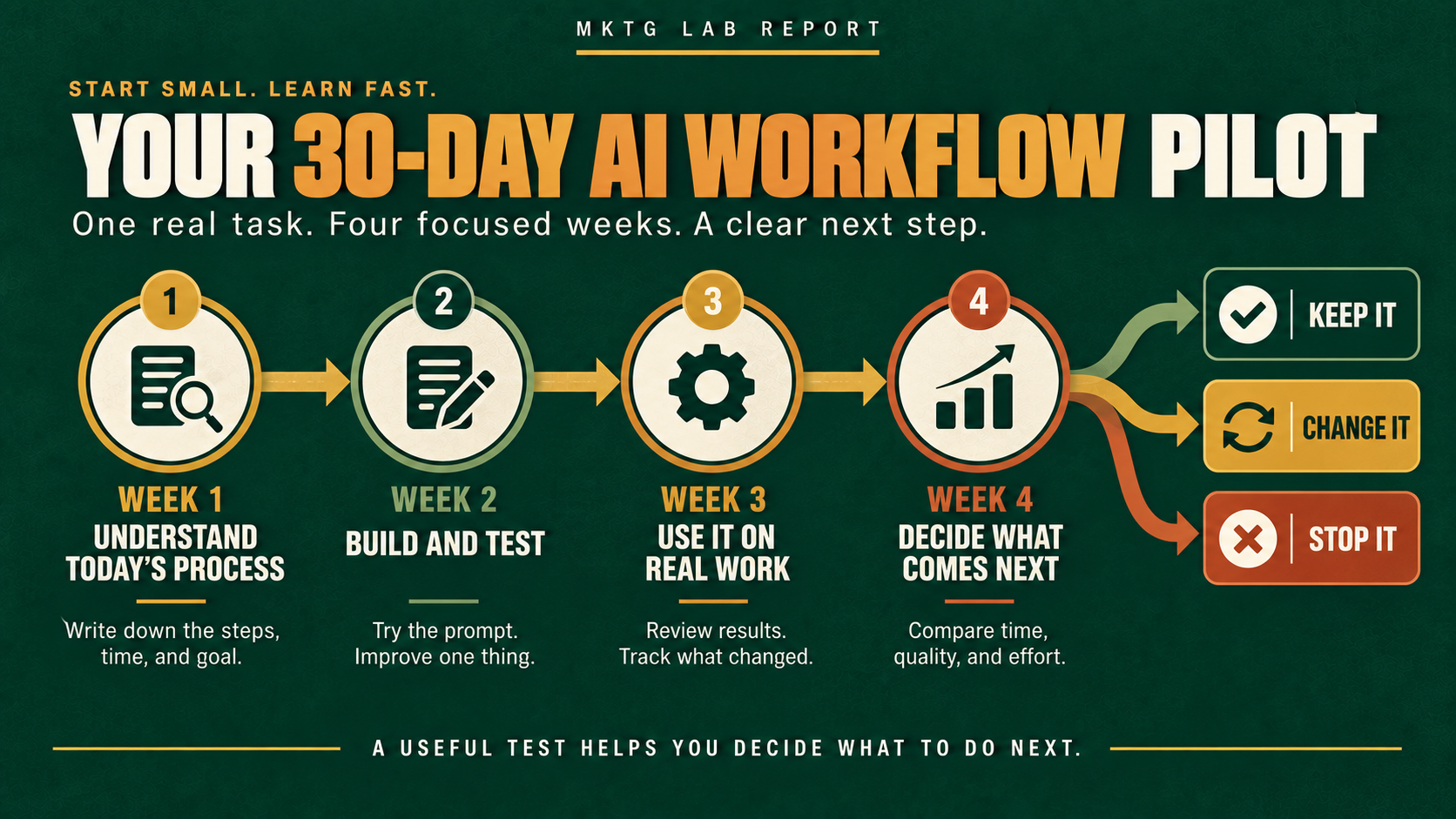
Week 1: Understand how you do the work today
Write down the current steps. Record how long the work takes, what information you use, where you get stuck, and what a good result looks like.
Week 2: Build and test the workflow
Adapt the prompt. Test it with information you are allowed to use. Compare the result with your normal work. Add the context and instructions that were missing.
Week 3: Use it on real work
Run the workflow several times. Review every result. Keep notes about what helped, what failed, and what you still had to do yourself.
Week 4: Decide what comes next
Compare the test with your old process. Did it save time? Improve consistency? Surface a useful insight? Reduce errors? Help you make a decision?
Then choose one of three paths:
- Keep it: The workflow is useful and repeatable.
- Change it: The idea works, but the information or instructions need improvement.
- Stop it: The task is not a good fit for AI or does not create enough value.
Stopping a weak workflow is not a failed test. It is a better decision than automating work that was never useful.
Seven rules worth keeping
- Start with one real problem. Do not adopt a tool and search for a reason to use it.
- Use information you are allowed to use. Remove personal, confidential, financial, medical, or customer-identifying details unless you have an approved and protected way to handle them.
- Check the result before using it. You remain responsible for what you publish, send, recommend, or decide.
- Verify facts and claims. Check quotations, statistics, product details, competitive information, and performance explanations.
- Keep facts separate from suggestions. AI can sound certain even when it is offering a possibility.
- Measure usefulness, not output volume. More posts, plans, or reports do not matter if they do not improve the work.
- Build the process around your needs. A useful workflow should survive even if you change AI tools later.
Start small enough to learn
AI can help one person or a large team create more capacity.
It can also help unclear ideas, weak information, and generic content move faster.
That is why I would start with one recurring problem. Give the AI useful information. Review the result. Put it to work. Measure what changed.
Then decide whether the workflow has earned a larger role in your business or brand.
That is the same lesson I learned while building my own marketing command center. The dashboard became useful because it connected information to decisions—not because it displayed more information. If you want to see how these principles can develop into a larger system, read How to Build a Marketing Dashboard With AI.
Useful systems are rarely built all at once.
They become useful because we keep learning where the technology helps—and where people still matter most.
Choose one workflow from this guide and run the 15-minute test. If it helps, use the 30-day framework to improve it. Download the AI Workflow Starter Workbook below to record what you tested, what changed, and whether you should keep, change, or stop the workflow.
Responsible AI resources
- For useful, audience-focused publishing: Google Search Central, Creating helpful, reliable, people-first content
- For quality and accuracy when using generative AI: Google Search Central, Guidance on using generative AI content on your website
- For privacy, reliability, transparency, and human oversight: National Institute of Standards and Technology, Artificial Intelligence Risk Management Framework Generative Artificial Intelligence Profile
- For supporting objective marketing and advertising claims: Federal Trade Commission, Advertising FAQs: A Guide for Small Business
FREE PRACTICAL RESOURCES
Put one workflow to work.
Use the workbook to choose, test, and evaluate a workflow—or download the compact scorecard and prompt collection separately.